Public Feedback Beta • Release Candidate v1.2.0-rc1
Your Money. Your Clarity.
An on-device personal finance and treasury ledger designed from first principles for user privacy, double-entry mathematical reconciliation, and offline autonomy. Track multi-bank accounts, credit card liabilities, statement imports, and EMIs in a 256-bit encrypted local vault.
Illustrative Preview • Synthetic Test Account (Vikram)
Architectural Foundation
Engineered for Sovereignty, Not Extraction
Most modern finance apps upload your banking passwords, SMS narrations, and spending habits to multi-tenant cloud servers. Money Plus was designed around three foundational principles.
1. Local-First Storage (No Mandatory Remote Servers)
Your core ledger records reside in your Android device's private application storage. The application does not require a remote account, central ledger server, or behavioral data broker to operate.
2. Double-Entry Mathematical Rigor
Every rupee is accounted for. Card bill payments, internal bank-to-bank transfers, and Fixed Deposit bookings maintain net-zero balance integrity without falsely inflating monthly expenses.
3. Offline Autonomy
Full offline functionality for core bookkeeping, statement imports, and ledger analysis. The app decrypts and runs queries against its local SQLCipher database without needing cellular or Wi-Fi connectivity.
Verified Capabilities
Comprehensive Personal Finance Capabilities
Every feature in Money Plus is built directly into the on-device engine and verified through exhaustive regression test suites.
Multi-Bank Treasury Management
Organize Savings, Current, and Cash wallets in one cohesive ledger. Track opening balances, real-time liquid reserves, and internal liquidity movements.
Verified Double-Entry Math
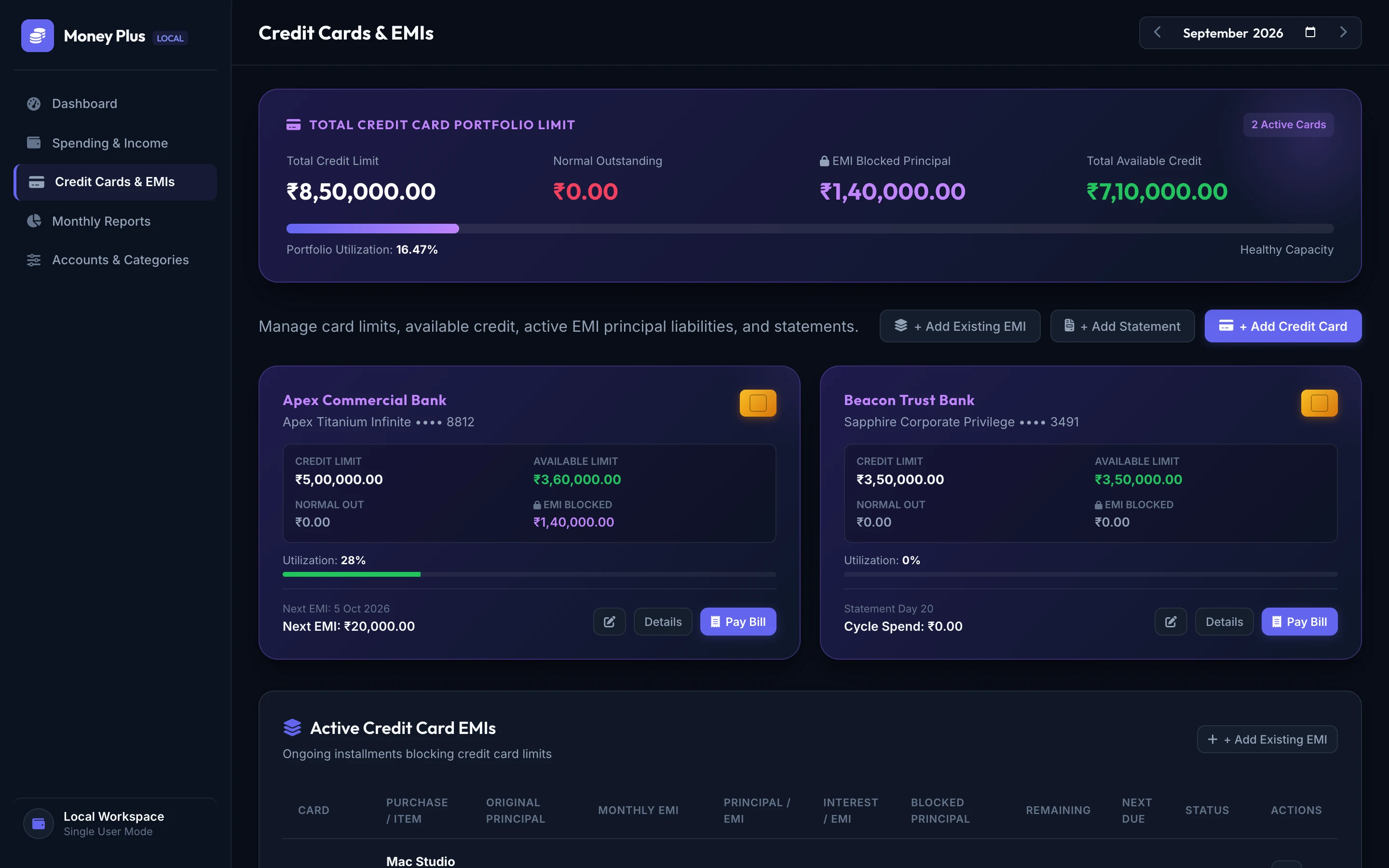
Credit Card & Billing Cycle Engine
Track statement generation dates, payment due deadlines, and total portfolio credit limits. Differentiate normal outstanding from unbilled EMI principal blocks.
Amortization Tracking
Universal Statement File Imports
Import bank and credit card statements in CSV and Excel formats. The engine matches 12-digit UTRs and RRNs to prevent duplicate records upon re-upload.
Local On-Device Parsing
Staged Transaction Review Queue
Imported records and notification captures are placed into a pending review queue. No transactions are posted without your explicit review and confirmation.
User-Confirmed Posting
Fixed Deposit & Asset Lifecycle
Log fixed deposits, interest yields, compounding frequencies, and maturity dates. Booking an FD transfers capital without triggering an expense.
Asset Amortization
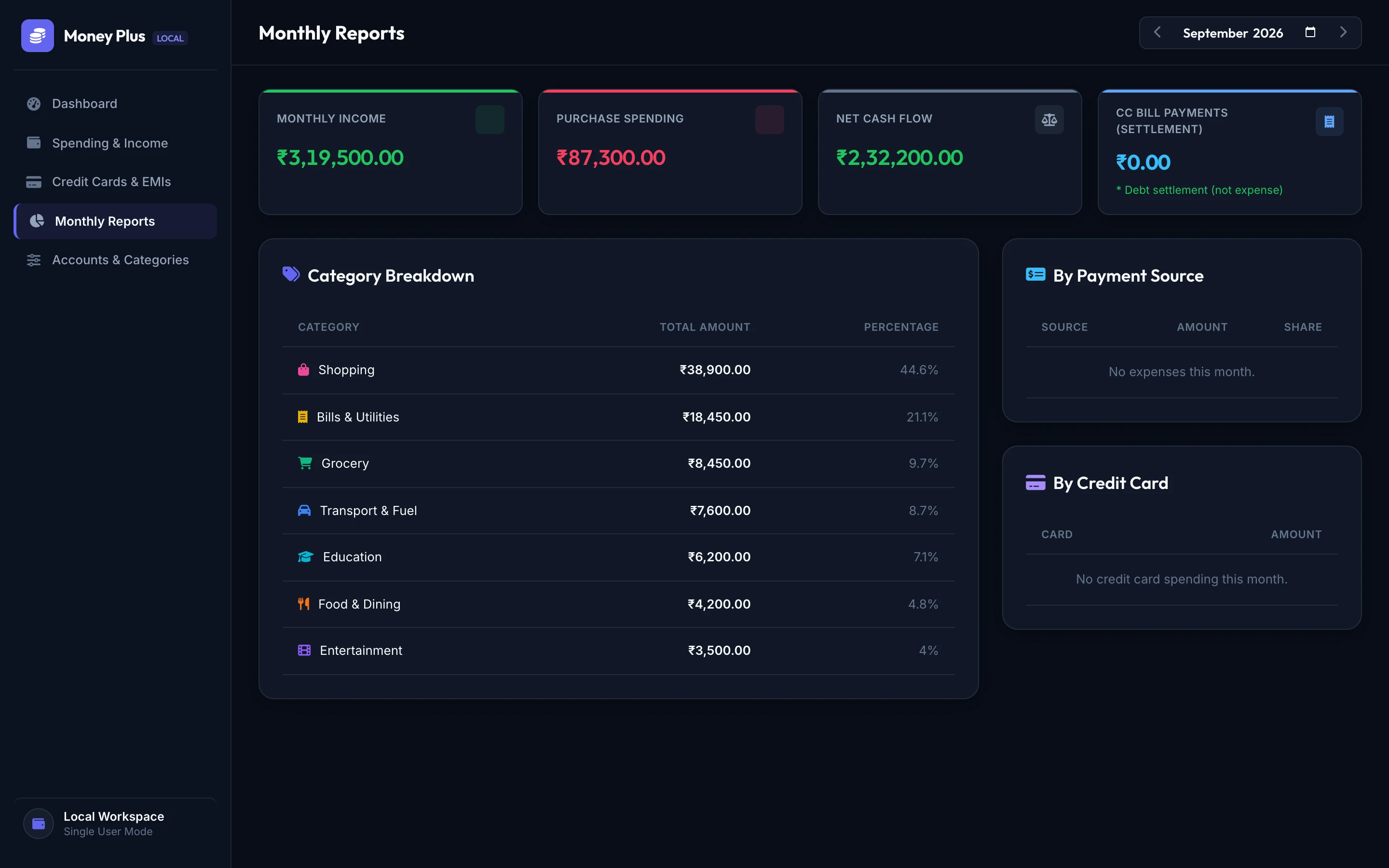
Monthly Cash Flow Analytics
View genuine spending distributions across custom categories. Gain insight into monthly cash deficits or savings velocity with responsive, high-contrast charts.
Transparent Categorization
Empirical Interface
Crafted for Density, Clarity & Focus
Explore high-fidelity views captured directly from verified local test environments. No hypothetical mockups or speculative interfaces.
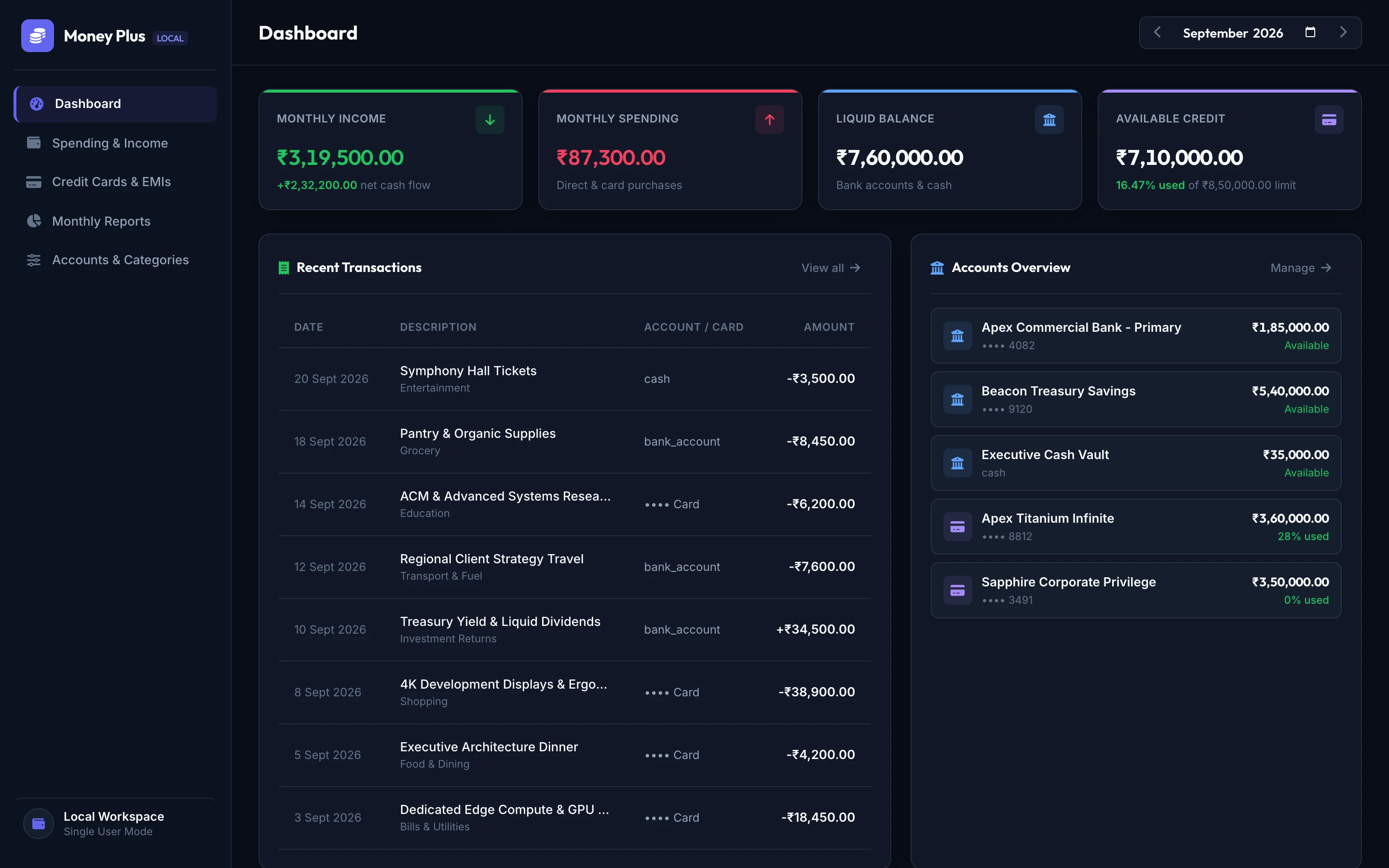
Financial Command Center: Net worth overview, monthly income/expense flow, and on-device vault status. Illustrative Test Data (Synthetic Balances)
Money Plus prioritizes an on-device architecture, storing data in Android app-private storage protected by SQLCipher page-level encryption and Android Keystore key management.
Honest Architectural Disclosure
No Bank Scraping: Money Plus does not ask for or store your internet banking passwords. Statement imports provide verified ledger accounting without third-party credential exposure.
Regulatory Roadmap: Automated Account Aggregator (AA) linking is currently sequestered in a developer audit sandbox awaiting final RBI-compliant production certification. It is not advertised as live connectivity today.
The 4-Layer Security Vault
How your data is protected on the physical Android hardware:
Android Keystore Key Protection
The master database encryption key is generated and managed via the Android Keystore system, backed by hardware TEE/StrongBox where supported by device hardware.
SQLCipher 256-bit AES
Every SQLite database page is encrypted on disk with 256-bit AES prior to physical disk writes via SQLCipher.
Inactivity Auto-Lock
Sessions automatically pause upon app backgrounding or inactivity timeout, prompting for master password re-authentication before sensitive financial figures are displayed.
No Third-Party Telemetry SDKs
Compiled without third-party tracking pixels, marketing SDKs, or ad networks. Your ledger stays on your hardware.
Questions & Answers
Frequently Asked Questions
Clear, direct answers regarding functionality, privacy boundaries, and offline operations.
What exactly does Money Plus do?
Money Plus is an on-device personal finance and treasury ledger application for Android. It enables individuals and professionals to track multiple bank accounts, monitor credit card statement cycles and unbilled EMIs, import bank/card statements with duplicate suppression, and maintain a mathematically verified balance ledger without exposing data to external cloud servers.
How are transactions added to the app?
Transactions can be added through three verified workflows:
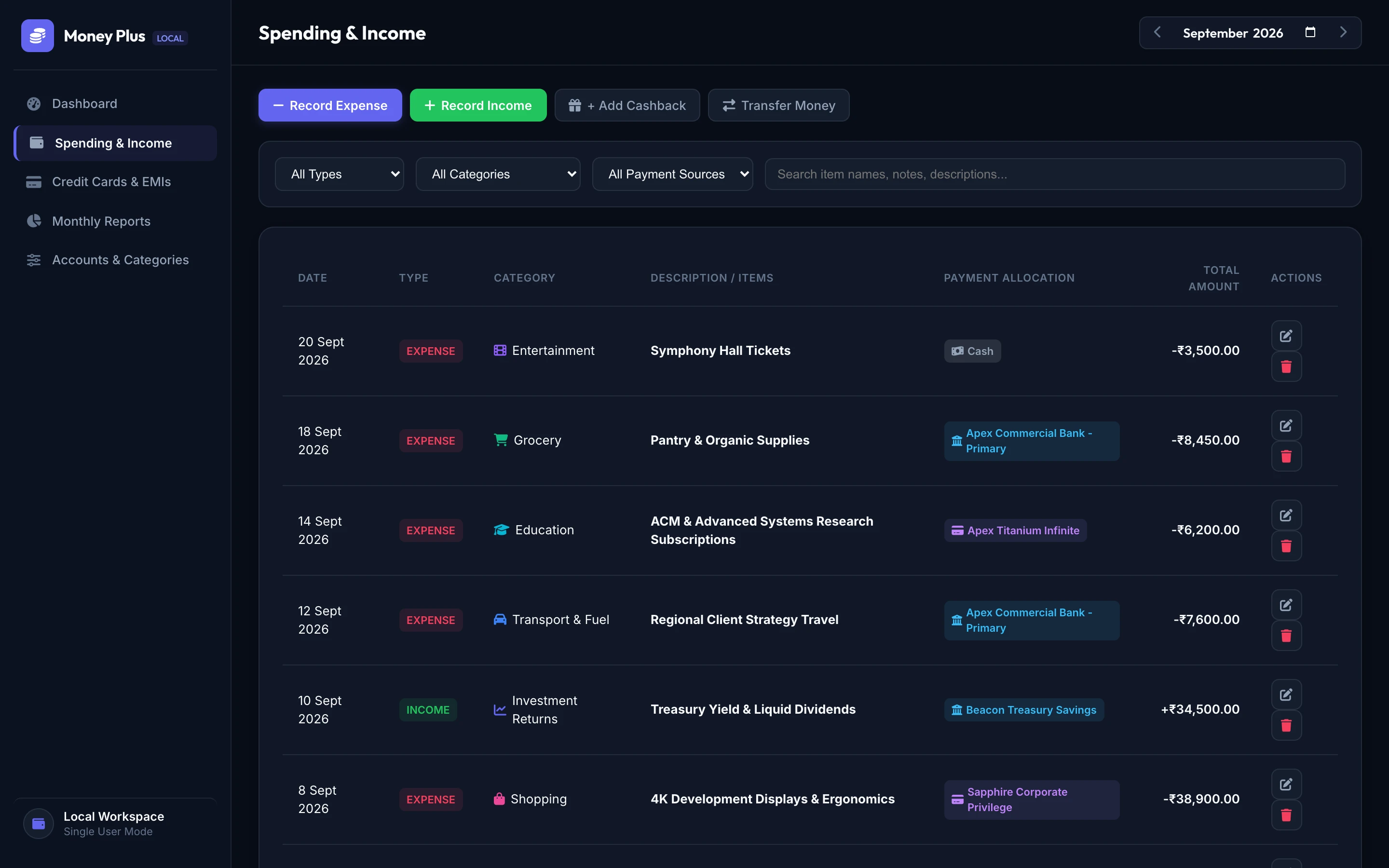
Manual Entry: Quick-entry modal with account selection, line-item splits, and category tagging.
Statement Import: Upload standard CSV or Excel statements from Indian banks and card issuers.
Android Notification Capture: Optional local notification listener that parses financial SMS/banking alerts and stages them in a pending review queue for user approval.
How do statement file imports work?
You simply upload your bank or credit card statement file directly in the app. The file is processed locally on-device by client parsers. The reconciliation engine extracts 12-digit UTRs and transaction reference numbers (RRN) to ensure that if you re-upload a statement or already manually entered a payment, no duplicate entries are recorded.
Can I link my bank account directly?
Not in the current public release. We believe in full transparency: live automated bank linking requires integration with an RBI-licensed Account Aggregator (AA). While the AA architecture has been built and sequestered in a developer audit sandbox, it will only be enabled in public releases once formal regulatory production agreements are finalized. Until then, statement imports provide sovereign, private reconciliation without handing over banking credentials.
Where is my financial data stored?
Locally within your Android device's app-private storage directory. In v1.2.0-rc1, account numbers, balances, categories, and ledger entries are stored in a local SQLite database encrypted page-by-page using 256-bit AES SQLCipher, with keys anchored in the Android Keystore. The release candidate operates no central cloud databases for user transactions.
Does the app work without an internet connection?
Yes. Core bookkeeping, ledger calculations, card liability tracking, and statement parsing are implemented offline-first and execute entirely on device. The release candidate has been verified to function without network connectivity (tested under Airplane Mode).
Which devices and Android versions are supported?
Money Plus is compiled for Android 5.1 (API Level 22) through Android 15 (Target API Level 34). It supports modern biometric authentication (fingerprint and face unlock) and edge-to-edge gesture navigation.
Public Feedback Beta
Verify Sovereign Financial Clarity
Money Plus is currently in an early public feedback beta for architecture review and statement reconciliation testing. Review verified cryptographic hashes and hardware specifications below.
Money Plus is currently in early feedback beta. We welcome bug reports, custom Indian bank/card statement parser requests, and cryptographic architecture feedback. For commercial or studio inquiries, reach our business desk separately.
Zero Data Collection: This static beta site operates no backend servers, database, or analytics scripts. Submitting this form opens your device email client directly to feedback@kryvlance.in.